


Cat® Central
4.5120.00 Reviews
App Specs
- Version
- 4.8.0
- Updated On
- License
- Free
- Downloads
- 1,000,000+
- Developer
- Caterpillar Inc.
- Categories
- Business
- Platform
- Android, iOS
Screenshots
 Analysis by AppCompare
Owning Cat® equipment is a very different experience from managing an ordinary vehicle, and that difference is exactly where Cat® Central makes sense. I tested it as a business-focused companion for people who need to keep track of equipment, maintenance responsibilities, and practical ownership tasks without jumping between unrelated tools. My first impression was that it is less about flashy presentation and more about putting the Cat ownership relationship in one place.
That focus matters. Caterpillar Inc. is not trying to turn this into a general fleet-management app for every brand. The app is built around Cat equipment, so its usefulness depends heavily on what you operate and how closely your work already connects with the Cat ecosystem. If that matches your situation, it can reduce everyday friction. If you only want a generic maintenance checklist or a universal vehicle tracker, a simpler alternative may be a better fit.
How Cat® Central builds trust around equipment ownership
I look at business apps differently from entertainment apps. When an app is connected to expensive machinery, trust is not just about whether the interface looks polished. I want to understand what the app helps me control, what information I am expected to provide, and whether I can make sensible choices about my account and equipment information. Cat® Central earns confidence mainly through its clear purpose: it is designed to simplify how you own, operate, and maintain Cat equipment.
The app is free, which makes trying it less of a financial commitment. It is also rated for Everyone, a useful sign that the presentation is intended to remain broadly accessible rather than being built around mature content. Its business category is appropriate, although the real audience is narrower than the category label suggests: equipment owners, operators, service managers, contractors, and people responsible for keeping machines productive.
The app has reached more than a million installs and holds an average rating of 4.4 from roughly four and a half thousand ratings. I would not treat those figures as proof that it will suit every operation, but they do suggest that Cat® Central has found a substantial audience beyond a small pilot group. The important question is still whether its Cat-specific approach fits your workflow.
One practical advantage is the developer identity. Caterpillar Inc. is named directly rather than leaving the app disconnected from the equipment brand it supports. For me, that improves the basic trust context: I know I am evaluating an official Cat-oriented tool, not an unofficial utility using similar branding. That does not remove the need to review account and privacy choices carefully, but it gives the app a more credible starting point.
What the app is really useful for
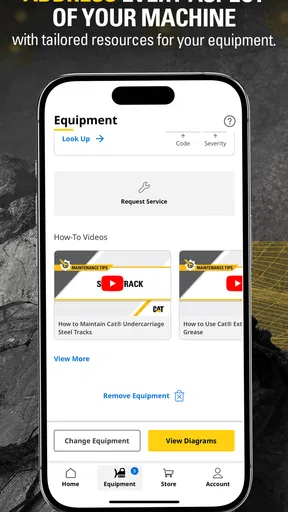
In daily use, I found the strongest value in treating Cat® Central as a central reference point rather than expecting it to replace every system used by a business. It is most helpful when ownership tasks are scattered across conversations, paper notes, browser bookmarks, and memory. Bringing those responsibilities into a Cat-focused app can make the next action easier to identify.
Worth Reading Before You Choose

EA SPORTS FC Mobile 26 Is a Bigger Football Game, but It Takes Time

Flipboard Shows What News Apps Must Do Beyond the Feed

Switching to Android Auto Means Rethinking Your Driving Routine

Google Calendar Makes a Crowded Week Easier to Manage

Ludo King Makes the Most of the Minutes Between Plans

Baby Panda World Brings Quick Play to Modern Phones, but Its Game Library Feels Busy
A realistic example is a small excavation company with one person handling several roles. In the morning, that person may need to check which machine is assigned to a job, remember a maintenance concern reported by an operator, and confirm what needs attention before the equipment leaves the yard. Instead of relying on a notebook that stays in a truck, the app can serve as the mobile starting point for those Cat-related tasks. The benefit is not dramatic automation; it is fewer small gaps in the handoff between ownership, operation, and maintenance.
I also see value for an owner who does not sit beside the equipment every day. A machine may be used at a remote site while the person responsible for costs and upkeep works elsewhere. In that situation, a dedicated Cat app is more relevant than a generic note-taking app because the equipment context remains central to the workflow. It helps the owner think in terms of the machine and its responsibilities, rather than a disconnected list of reminders.
Account choices and information handling
Trust becomes more practical when I consider the moments at which an app asks me to identify myself, connect equipment, or enter business-related details. Cat® Central should be approached as an account-based business tool, not as a casual calculator that works without context. Before adding information, I would read the visible sign-in, profile, equipment, and privacy screens carefully and provide only what is needed for the task I am actually trying to complete.
This is especially important for mixed fleets. If your company operates Cat machines alongside equipment from other manufacturers, I would avoid assuming that the app should become the master record for everything. A better workflow is to use Cat® Central for the Cat portion of the operation and keep broader fleet records in the system already used by your business. That separation reduces duplication and makes it clearer which information belongs where.
I also recommend deciding in advance who should control the account. A sole owner may be comfortable managing access personally, while a larger company should think about staff turnover, shared devices, and responsibility for equipment records. The app can be useful without every worker having unrestricted access, but the exact setup should follow the account controls visible in the current app rather than assumptions about how a business account ought to work.
When an app touches operational information, convenience can tempt people to enter more than necessary. My rule is simple: start with the equipment and ownership details needed for the immediate workflow, then expand only when a clear benefit appears. This is a better approach than importing an entire company directory or copying sensitive notes into a mobile app before understanding how the information is organized and managed.
Where user control matters most
The most important user-control moments are not necessarily the first screen. They occur when I connect an account, identify equipment, invite another person, or decide whether the app should send alerts. Those choices can affect how the tool fits into a real workplace. I would pause at each one and ask whether the setting supports my role or simply adds another stream of information to monitor.
Notifications deserve particular attention. Maintenance-related reminders can be helpful when they prevent a missed task, but too many alerts can make an operator ignore the important ones. I would begin with the smallest useful notification setup and adjust it after seeing how often the messages arrive and who is responsible for acting on them. A reminder is only valuable when it reaches someone who can do something about it.
Shared-device use also changes the risk. A phone or tablet left in a service vehicle may be convenient for operators, but it can expose account information to the next person using the device. I would use the device’s own lock and account protections, avoid leaving an account open unnecessarily, and make sure workers understand whose information they are viewing. These are ordinary precautions, but they matter more when the app is connected to business equipment.
Another useful habit is to review account settings after a change in responsibility. If a supervisor leaves, a contractor finishes a project, or a machine changes hands, the account should not continue reflecting the old arrangement by default. I would treat access review as part of equipment administration, alongside checking service records and job assignments.
Data-sensitive moments in everyday work
The most sensitive use cases are likely to involve a combination of equipment identity, work location, maintenance status, and the people responsible for a machine. Even when each detail seems harmless by itself, together they can reveal how a business operates. I would therefore avoid placing unnecessary job-site details, customer names, or internal cost notes into fields that do not clearly require them.
For contractors, location deserves special care. A machine’s work site may identify a customer or reveal the timing of a project. If the app presents location-related choices, I would select the least expansive option that still supports the task. I would also check the phone’s permission controls rather than automatically granting ongoing access when a more limited choice is available.
Maintenance information can be sensitive in a different way. A note about repeated faults, delayed servicing, or an operator concern may be operationally important, but it should be written in a factual, professional way. I prefer notes that describe what was observed and what action is needed, rather than including speculation or personal comments. That makes the record more useful to the next person and reduces the chance that a business tool becomes a place for unrelated employee information.
Before handing a device to a technician or temporary worker, I would check what the current screen exposes. The quickest route to a task is not always the most private route. Closing unrelated pages, using the relevant account, and limiting access to the equipment involved are small steps that preserve control without making the app impractical.
Strengths beyond a generic checklist
A generic maintenance app can record dates and reminders, but it usually makes me build the equipment context myself. Cat® Central has a more natural fit for Cat owners because the brand and the ownership relationship are part of the app’s purpose. That distinction is valuable when the work involves more than remembering an oil change: I may need a place to orient myself around a specific Cat machine and the responsibilities attached to it.
The first non-obvious insight is that the app works best as a coordination layer. I would not ask it to replace a company’s accounting platform, dispatch system, or complete fleet database. Instead, I would use it to keep Cat-related ownership and maintenance activity easier to reach, then leave financial approvals and cross-brand reporting in the tools designed for those jobs.
The second is that the app can help expose ownership gaps. If nobody knows who is responsible for checking a machine, a digital record alone will not solve the problem. However, using the app during a handoff can reveal whether the owner, operator, and maintenance contact are working from the same understanding. I would make the app part of the handoff routine rather than waiting until a machine has already missed attention.
The third is that a smaller business may gain more from consistency than from advanced functionality. A company with a few Cat machines does not need a complicated rollout to benefit. Agreeing on one naming convention, one person responsible for account administration, and one routine for reviewing machine information can prevent confusion. The app becomes more useful when everyone uses it in the same limited, deliberate way.
There is also a trade-off. A Cat-specific tool can be more relevant than a generic alternative, but that relevance may narrow its usefulness outside the Cat portion of your operation. If you need one unified view across many brands, a dedicated fleet-management platform may be better. You may still keep Cat® Central for brand-specific ownership tasks, but using both tools means accepting some duplication.
Version, compatibility, and the practical setup
The current version is 4.7.0, and the app requires at least operating system version 11. That requirement is reasonable for many recent phones and tablets, but it can become a real issue in a business with older shared devices. Before planning a rollout, I would check every device used by operators and service staff rather than testing only the manager’s phone.
The release history shows that the app has been available since December 9, 2022, giving it time to move beyond a brand-new launch. I still recommend treating updates as part of the operating routine. A business app can be affected by changes in sign-in behavior, device compatibility, or account controls, so I would update a test device first when the equipment workflow is especially important.
Setup should begin with one clearly defined use case. For example, start with the person responsible for a small group of Cat machines and establish how equipment information will be reviewed. Once that routine works, add other users carefully. This approach makes it easier to identify whether a problem comes from the app, an unclear internal process, or incomplete information.
I would also avoid making the app the only place where critical operational knowledge exists. Keep the company’s established backup and documentation practices, particularly for information needed during outages, staff changes, or account-access problems. The app can simplify access, but resilience still depends on a sensible business process around it.
Who should use it and who should skip it
I would recommend Cat® Central to Cat equipment owners who want a more focused way to manage the ownership and maintenance side of their machines. It is a particularly good candidate for small contractors, independent operators, and managers who currently depend on scattered notes or informal messages. The free price makes experimentation straightforward, and the Cat-specific focus can save time when the equipment is the center of the workday.
I would also consider it for a service coordinator who needs a mobile reference point while moving between a yard, a job site, and an office. The app’s value is strongest when it reduces the distance between the person responsible for equipment and the information needed to act on it.
I would skip it as a primary solution if your fleet is mostly non-Cat equipment, if your company already has a mature multi-brand platform that everyone uses consistently, or if you need detailed financial, dispatch, or enterprise reporting in one place. In those cases, adding another app may create more administration than benefit. It may still have a supporting role for Cat machines, but it should not be forced into a job it was not designed to handle.
People who dislike account-based tools should also think carefully before adopting it. The app’s usefulness comes from organizing ownership information around Cat equipment, so users who want an entirely offline, paper-like checklist may find a simpler tool more comfortable. That is not a flaw so much as a mismatch between the app’s purpose and the user’s preferred workflow.
My cautious verdict after using it
Cat® Central is a sensible business app when the equipment in front of you is Cat and the problem is scattered ownership and maintenance information. I like its focused identity, its free entry point, and the fact that Caterpillar Inc. is clearly connected to the product. The app feels more useful as a practical control center for Cat responsibilities than as a universal fleet platform.
My recommendation comes with a condition: use it deliberately. Review the visible account and privacy choices, keep permissions aligned with the task, limit sensitive notes, and decide who should manage access before several people begin using the same equipment records. Those habits do more for trust than simply installing the app.
With its 4.4 average rating, broad install base, Everyone age rating, and support for devices running operating system version 11 or later, it is easy to consider for a Cat-focused operation. Still, the right test is not whether it looks useful in isolation. Try it with one real machine, one responsible person, and one repeatable workflow. If it removes confusion without creating a second database to maintain, it is worth keeping. If your needs are cross-brand, highly specialized, or already well served elsewhere, I would choose the existing system and use Cat® Central only where its Cat-specific focus adds something meaningful.
Pros
- Official source for Cat equipment manuals and support information.
- Helps users find machine details in one centralized mobile app.
- Useful for checking product information while working in the field.
- Supports access to Cat dealer and service resources.
- Familiar Cat branding can make information easier to trust.
Cons
- Primarily useful to Cat equipment owners
- operators
- and dealers.
- Some features may require an internet connection or account sign-in.
- Information availability can vary by machine model and region.
- The app may feel unnecessary for users without Cat machinery.
- Large manuals and documents may take time to load on mobile data.
FAQs for Cat® Central
What is Cat® Central, and what can I use it for?
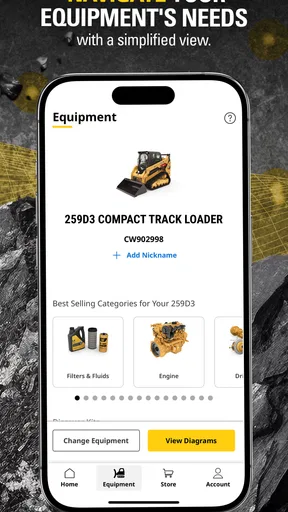
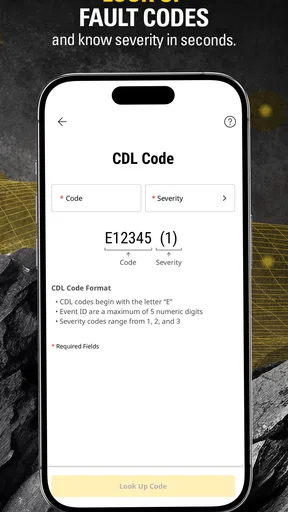
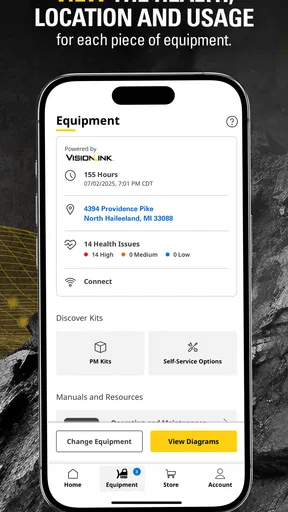
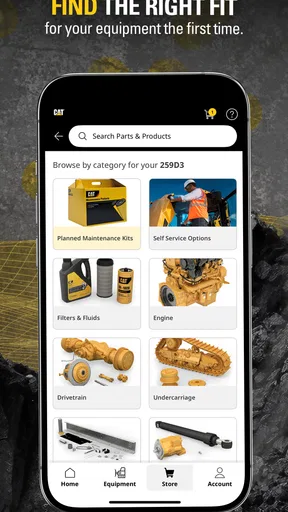
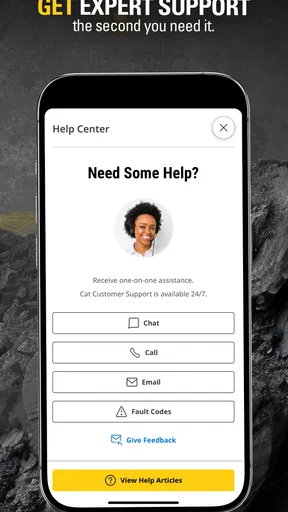
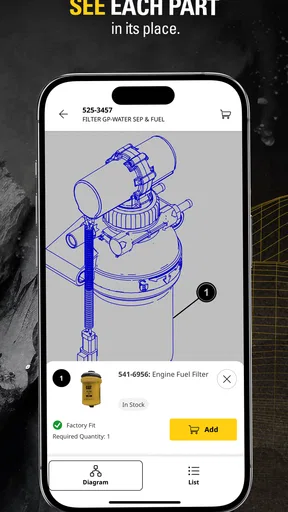
Cat® Central is a mobile application designed to help Caterpillar equipment owners, operators, and customers access useful information in one place. Depending on your equipment and region, it may provide machine details, operation and maintenance resources, parts-related information, service support, and account features. The exact tools available can vary by country, Caterpillar product, and whether your machine is connected or registered.
Do I need a Caterpillar account or a specific machine to use Cat® Central?
Some sections of Cat® Central may be available without signing in, but many personalized features require a Caterpillar account. Registering or linking equipment can unlock more relevant manuals, maintenance information, machine details, and support options. Users should also keep their machine identification information available, since certain functions may depend on the model, serial number, dealer relationship, or connected services enabled for the equipment.
Is Cat® Central compatible with all Caterpillar machines and equipment?
Cat® Central is intended for Caterpillar customers, but compatibility is not necessarily identical across every machine, model, or market. Available features can depend on the equipment’s age, product category, connectivity, region, and registration status. Before downloading, users with older machines or specialized equipment should check whether their model is supported and whether the desired service, documentation, or digital feature is offered in their country.
Does Cat® Central require an internet connection, and can I use it offline?
An internet connection is generally needed for signing in, synchronizing equipment information, accessing current account data, contacting support, and using connected-machine services. Some documents or information may be saved or remain available after they have been loaded, but offline access should not be assumed for every feature. Availability can also depend on device permissions, network quality, and Caterpillar service coverage.
Is Cat® Central free to download, and are there additional charges?
The Cat® Central app may be free to download, but downloading it does not necessarily mean that every Caterpillar service is free. Certain connected features, subscriptions, dealer services, maintenance programs, data plans, or equipment-related products may involve separate costs. The app itself should be obtained through the official Google Play or Apple App Store listing, where current pricing, requirements, and regional availability can be reviewed before installation.


